iOS 1.8.0 / Companion Build 22
A private Codex and Claude monitor,
visible anywhere.
Start free with one Mac and one account. See Codex and Claude quota windows, active task states, and the moments that need your attention—without moving provider credentials off your Mac.
iOS 1.8.0 is available now · Notarized Companion 1.9.1 (Build 22) is available for macOS
C
CodexMac Studio · live
A
ClaudeMacBook Pro · live
49-second product film
See the signal.
Skip the window hunt.
Real English TaskGauge screens, captured from the iOS Simulator. Turn on sound for the narrated tour, or use the included English captions.
The private mesh
A window into your Macs.
Never a key to them.
Each Mac observes only the local usage and task metadata you enable. The Companion normalizes it, encrypts it on-device, and sends a readable snapshot only to your paired iPhone.
01
Mac Companions
Observe local Codex and Claude metadata. Provider credentials never enter the sync model.
encrypted snapshot
02
Blind relay
Cloudflare keeps encrypted payloads plus minimal routing metadata. It never receives your pairing key or plaintext quota and task data.
encrypted payload
03
Your iPhone
Decrypts quotas and task states locally, then keeps the app and widgets aligned.
Signal, not noise
Codex and Claude, at a glance.
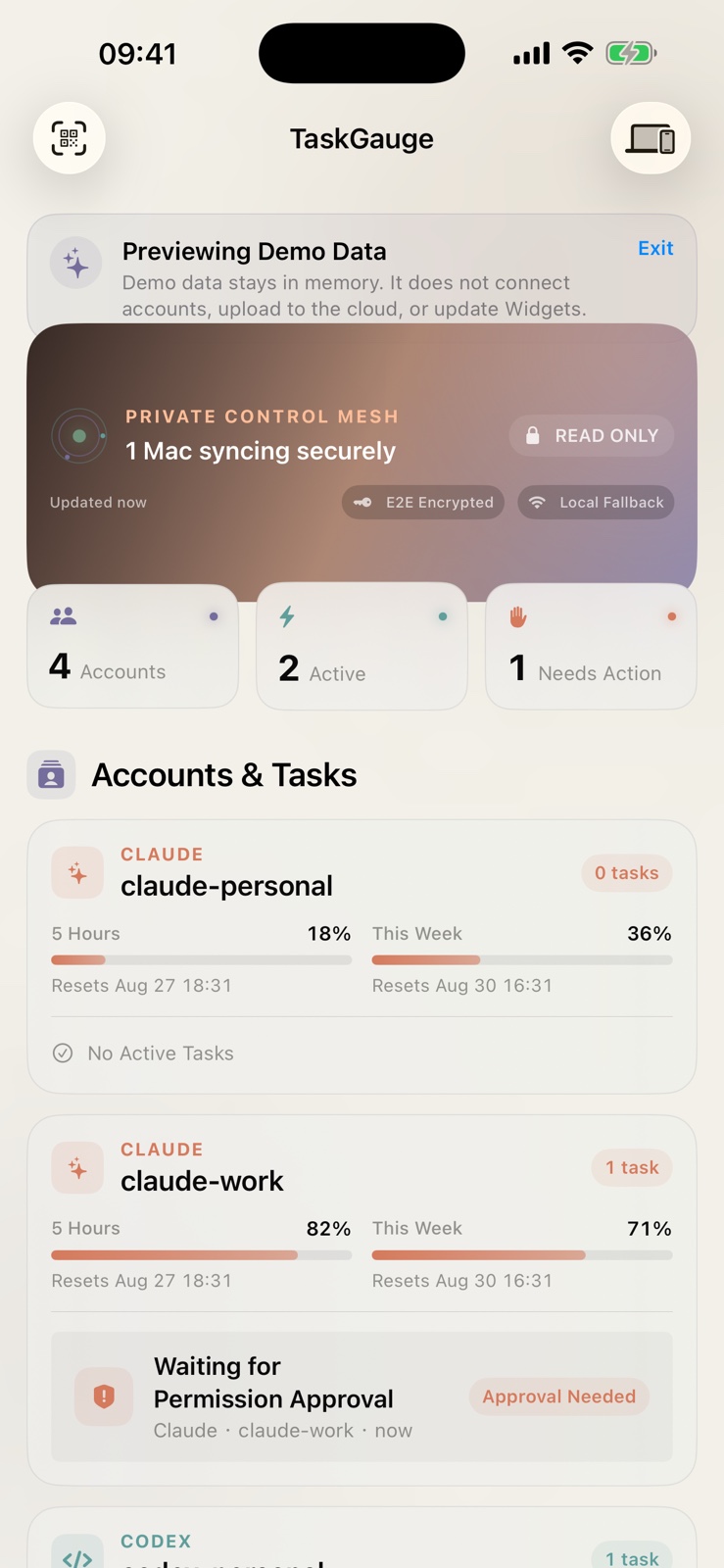
Five-hour and weekly windows, with verified reset times when available.
Working, waiting, approval, completed.
See the current task name under the right account and Mac — not an anonymous identifier.
One view across every desk.
Pair each Companion once. Accounts stay grouped by their source instead of overwriting one another.
Foreground updates arrive in moments.
WebSocket sync merges new encrypted snapshots while the app is open; widgets keep the latest safe state.
Start free, unlock once
Useful from day one.
Unlimited when you need it.
Core monitoring stays useful without a subscription. Lifetime Pro is a single $9.99 purchase, not a recurring charge.
One Mac, one account, live in-app monitoring.
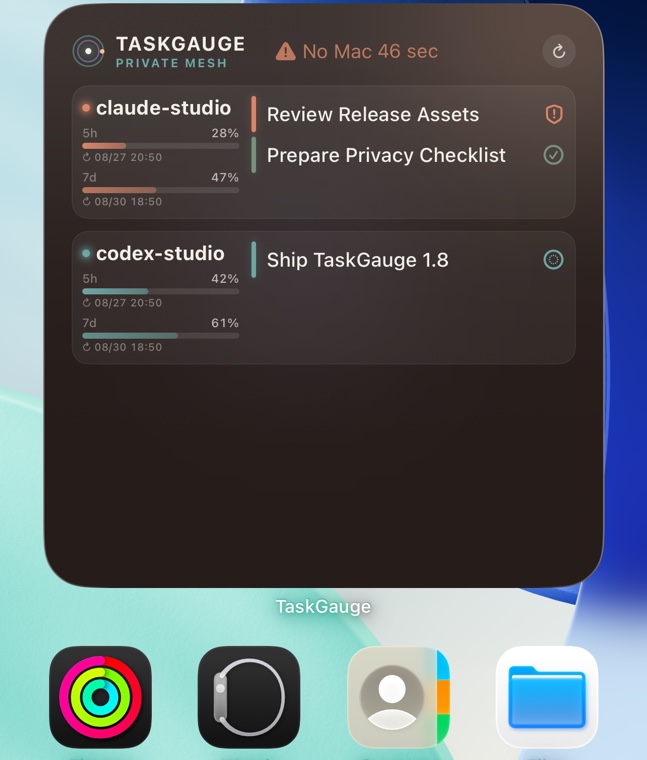
Track quotas, reset times, and current task states in the app, plus keep a basic quota widget on your Home Screen.
Every Mac, account, widget, and Live Activity.
Unlock unlimited paired Macs and accounts, task and combined widgets in every supported size, and Live Activities.
Buy once. Restore on your Apple Account.
Use Restore Purchases whenever you reinstall or move to another device signed in to the same Apple Account.
Existing paid owners keep Pro.
Customers who bought TaskGauge before the Freemium update receive Lifetime Pro automatically.
- Usage percentages and reset windows
- Allowed task names, states, and timestamps
- Your paired Mac name and sync health
- Provider passwords, tokens, or API keys
- Prompts, replies, files, diffs, or transcripts
- Remote approvals or task execution controls
Required on every Mac
Download the
Mac Companion.
Install one Companion on each Mac you want to monitor. Codex and Claude credentials stay on that Mac; only normalized, encrypted quota and task snapshots reach your paired iPhone.
Installation and support →
APPLE NOTARIZED
Version 1.9.1 · Build 22

TaskGauge Companion
macOS 14 or later · Apple silicon + Intel · 918 KB
- Released
- October 12, 2026
- Format
- Universal macOS app (.zip)
- SHA-256
5d0de177d7674fb658f5d9837d6029d662373384d62b5bc033f12e84ccf39d1d
Build 22 restores Codex connectivity after desktop bundle changes and improves connection diagnostics and retry recovery. Removed-account and archived-task cleanup remain supported. Existing pairing identities are preserved. Compatible with TaskGauge 1.8 and 1.9.
Pair once
From Mac to glance
in three steps.
- 1Install Companion
Download the current build and run it on each Mac you want to observe.
- 2Scan the pairing code
Confirm the short-lived QR code and six-digit check code on your iPhone.
- 3Add your widgets
Keep each account’s quota and current work visible on the Home Screen.
Questions, answered
What TaskGauge monitors—and what it never controls.
TaskGauge is deliberately an observation tool. These boundaries explain the product more clearly than a generic “AI dashboard” label.
What does TaskGauge monitor?
Enabled Mac observers normalize Codex and Claude quota windows, allowed task names, lifecycle states, timestamps, source Macs, and sync health.
Do provider credentials leave the Mac?
No. Passwords, tokens, API keys, prompts, replies, files, diffs, and transcripts do not enter the synchronized snapshot model.
Can the iPhone approve or execute tasks?
No. TaskGauge shows working, waiting, approval, and completed states, but it cannot send prompts, approve permissions, or remotely run agent actions.
Can I monitor more than one Mac?
Yes. Install and pair one Companion per Mac. Accounts and tasks remain grouped by their source instead of overwriting one another.
Why is the Mac Companion required?
The Companion observes the local metadata you enable, encrypts a normalized snapshot on-device, and sends ciphertext to your paired iPhone.
Is TaskGauge a general chat analytics tool?
No. It is built around supported local Codex and Claude observers on paired Macs, not the ChatGPT or claude.ai conversation history.
TaskGauge